
DEF CON 34 Part II: Hands On Fun
DEF CON 34 is in the books. This year I spent much of the conference getting hands-on with drone hacking, web exploitation, soldering an IoT project, and finally spending some time with the new DEF CON badge.
 jim@nerdkernel.comAugust 14, 20267 min read
DEF CON 34 is officially in the books. I had a lot of fun this year and ended up in some places that I would not have thought I would be headed into the conference. As opposed to last year I did not really have a plan before I got there. It was really nice and quite liberating to just nerd out on whatever I found interesting at any particular moment.
Hands on Fun at the Workshops
This year I spent quite a bit of time at different workshops. DEF CON holds official workshops every year. These are typically 4-hour, interactive classroom sessions held in private areas during the conference. Additionally individual Villages will also hold their own workshops which are typically between 1 and 2 hours. The official workshops require registration before the conference, which usually opens up sometime in July. They have limited space and fill up incredibly fast; literally within minutes of registration opening. This year I missed registration, so no officially workshops for me. There was one that I was really interested in where I would have built a small device to detect electro magnetic fields. I was a little bummed but my own fault for not staying on top of the registration dates.
Luckily for me, the Villages provided many other opportunities. The Village workshops are first come, first server and usually have limited space, though from my experience they do their best to squeeze in as many people as possible. My first stop Day 1 was the Aerospace Village and their hands on workshop on hacking drones. I had never visited the Aerospace Village before, and I found some very cool and nerdy things going on their. The drone hacking workshop was very cool. They provided what looked like to me like a pretty standard DJI drone and a walkthrough for hacking it. That included extracting the firmware form the onboard microSD card, gaining access to the configuration files, which ultimately lead to the revealing the Wi-Fi password for the built access point, which they stored in plain text. It was surprisingly easy to hack, largely due to the complete lack of any security controls on the device.
My next stop was Noob Community was provided a workshop on hacking web servers; essentially web hacking 101. They walked us through the steps of gaining root access to a web server using a SQL injection technique. It’s an older exploit and the web server was purpose-built for the workshop to be vulnerable, but I still found it very informative to see how these types of attacks work. Quick aside, a Village at DEF CON is an official, venue-assigned mini-conference area focused on a specific technical niche where as a Community is a broader social or organizational group. The Communities tend to be grouped into one area at the conference.
The last workshop I did was in the IoT Village where I made an IoT Cat Lamp that is controllable via Wi-Fi or Home Assistant. I had to solder all the base components together that controlled the lamp. I primarily did the workshop to brush up on my soldering skills. I am getting back into electronics tinkering and wanted to see if I could still solder worth a damn and also because I thought it would make a nice souvenir for my wife.
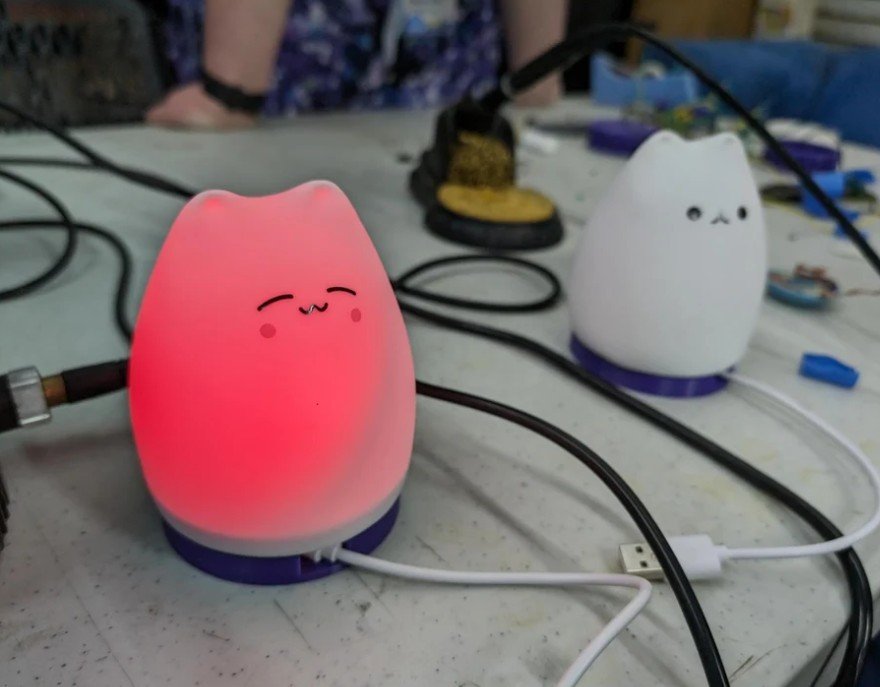
After carefully soldering all 12 connection points of the controller to the main board and then another four for the power switch, I will admit I was quite proud of myself. That was until I plugged my lamp in and nothing happened. I rechecked solder joints and touched one or two of up but still no lights. Maybe I can’t solder worth a damn. Eventually I did ask the instructor to inspect my board and he confirmed that the solder points looked good. After a minute or so he noticed something and revealed the issue. I was given an older version of the board that they don’t use anymore that has a spot on the edge of the board where you are supposed to solder a resistor. It serves no useful purpose and was just meant to provide additional opportunity to practice soldering. After jumping the solder points with a short piece of metal my lamp lit up without. Vindication! My honor is intact.
There was another workshop I had considered at the IoT Village to build a Wi-Fi Nugget which can be used for various Wi-Fi hacking uses, but some of the talks and other happenings sparked my interest a little bit more. Also, anyone can purchase most of the DIY kits from the IoT Village at retia.io , so I will still have an opportunity to build one at any time.
The Badge
As I mentioned in Part 1 I was most excited about this years badge. The program book for the conference had a preface about the badge from its creator, Andrew ‘bunnie” Huang, that dove a bit deeper into his vision, intent for badge, and it’s continued life after DEF CON. In his words:
“We wanted this year’s badge to have a life after the conference, so it consists of two parts: a
base board with lights and artwork, and a removable clear plastic core module that you can
carry around in your pocket after the conference.”
I did tinker a little bit with the badge the first night, but didn’t get too far into the weeds. Just to personalize my badge a bit for the conference, I did add the Nerd Kernel logo to my badge.
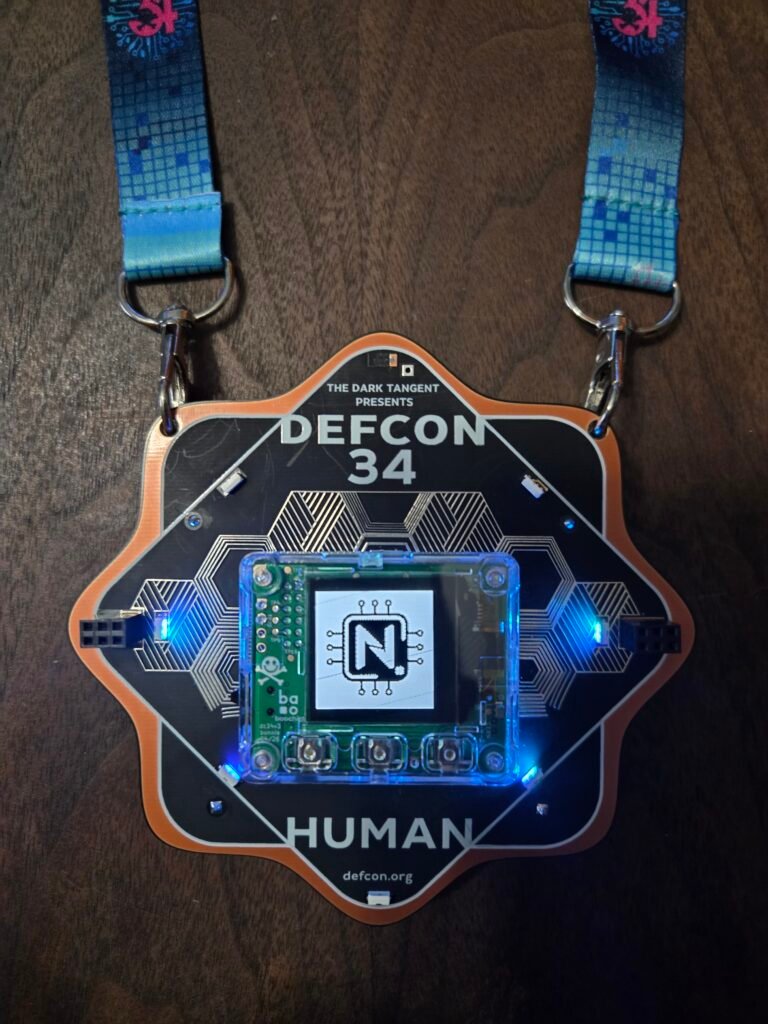
I was also impressed by the number of attendees who came to conference prepared with add on devices to plug into the SAO connectors. They mostly consisted of decorative items, but it was still cool to see. DEF CON’s no picture or video policy prevented me from grabbing any pics to share with you.
I was also impressed to discover some of the functionality that is already built into the badge and I can’t wait to do more tinkering of my own. The badge did include a little kit for once the plastic core is removed to secure the back cover and a cover for the USB-C port. Below are more detailed specs about the badge.
Tech specs of the badge core:
- Baochip-1x mostly open RTL SoC
- 350MHz Vexriscv RV32-IMAC/MMU + 4x 700MHz PicoRV32 RV32-EC/Zmmul I/O cores
- 2MiB on-chip SRAM + 4MiB on-chip RRAM (similar to FLASH)
- On-chip cryptography accelerators, TRNG, and more
- QR code data exchange: camera for input;128×128 black and white OLED display for output
- USB type C interface
Software features:
- Secure bootloader + Xous OS. Pure Rust, virtual memory, 100% open source
- FIDO2 hardware security key over USB-C
- Plaintext password manager & TOTP store, using camera + browser plug-ins and USB-C
- Upload & display a your own black and white logo via USB serial
- Upload & run code on the BIO via USB serial
- Build & upload your own unsigned firmwares via USB mass storage
I think one of the first things that I really want to play with are the password manager and TOTP store. A portable, hardware password manager that I can carry with me is the kind of usability feature I was looking forward to. And I as mentioned in Part I, I am really interested in seeing what the other members of the community come up with. By the first day someone already had a playable version of Doom running on the badge..
We Bid Adieu Until Next Year
Every year I attend, DEF CON always seems to breeze by like a whirl wind. As one of my favorite events of the year I get built up with anticipation as it get closer to starting, and I am always sad to see it go when its over. This is one of those events where it’s truly impossible to see it all. And no matter how much I try to pack in there’s always something I wish I saw or did. Unfortunately I will have to wait another year to have another go at it. For those of who did attend and for those who will in the future, hopefully our paths cross at some point. As always, I hope that you found this both interesting and informative and I will see you down the road.