
The Ultimate NAS Upgrade, Part II: More Than Just Storage
The search for the perfect NAS motherboard goes deeper. In Part II of the Ultimate NAS Upgrade, I compare several CWWK boards, rethink what this system could become, and settle on a Xeon-based platform for the build.
 jim@nerdkernel.comAugust 16, 20268 min read
If you missed Part I of the Ultimate NAS Upgrade, you can read it here.
In Part I of the Ultimate NAS Upgrade I mentioned that in my search I found my way to Chinese manufacturer with a focus on NAS motherboards in the mini-ITX form factor. I was able to narrow my choice down to two boards from CWWK, and after very careful consideration made a final decision.
A Spark of Interest
Immediately upon landing on the CWWK website I am given a surge of hope in my search for a board that will support 5 SATA drives. The first offering is an Intel N150 based motherboard touting 6 x SATA 3.0 connections. 2 x 10 Gigabit Ethernet ports, and an amazing 3 x NVME slots in a mini-ITX package. Needless to say I am a bit excited.
As I dig a little deeper into the specs, my excitement dampens a little bit. First the processor. While a massive upgrade from the 3rd Gen Celeron currently in the NAS, the Intel N150 has four Efficiency cores and no hyper-threading. More than likely powerful enough to handle TrueNAS, but I would have preferred Performance cores as least. The next thing that I notice is the real deal-breaker for me. This board does not have a PCI-e expansion slot. This definitely should not come as a surprise. They managed to squeeze three 3 x 2280 NVME slots and 6 x SATA ports onto a mini-ITX board; sacrifices had to be made somewhere, understandably.
While the price is in the range I am looking, about $`175 at the time I was looking, and it includes the processor, I really want something with a PCIe slot. Again this board is close, but not quite what I am looking for. Also, there is now an idea forming in the back of my mind for some extra capabilities with this upgrade.
A Serious Contender
I continue my search and the next board that catches my eye appears that it may hit all the marks. The board is CWWK Micro-Control 8-Bay NAS – Intel i5-8265UES. It comes out of the gate swinging. A 8th Gen Core i5 Intel processing with 4 cores and Hyperthreading, 8 x SATA 3.0 ports, 2 x Gen3 2280 NVME slots, and a PCI-E x 4 expansion slot. Its also in my price range at $150 at the time of my search.
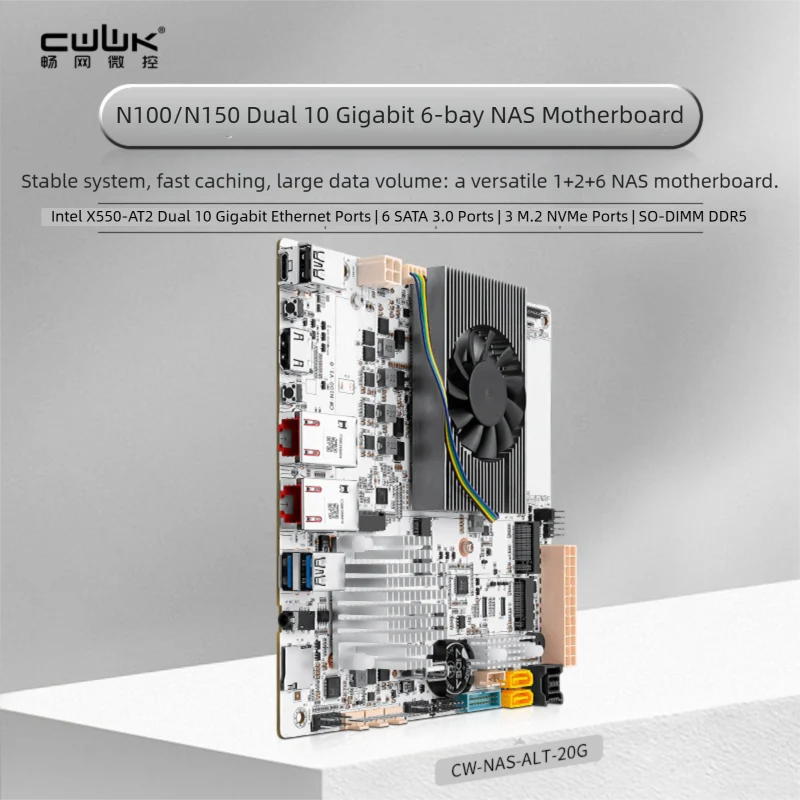
At this point I feel confident that I found my board. I would be making a few compromises. The fact that its a soldered CPU with no upgrade path gives me a little bit of pause. No chance up upgrading to a Core i7 with more cores. Additionally, the ES version of the i5 processor has known bugs that will not be patched at this point by Intel. I would also prefer standard 288-pin DIMM Slots rather than 260-pin SODIMM slots as standard DIMMs have slightly higher speeds and peak bandwidth. Lastly the x4 PCI-e slot is almost a deal breaker. I definitely want 10 Gigabit network connectivity. I would have no problem adding a 10 Gigabit Fiber adapter, but dual port adapters usually need and x8 PCI-e slot. None of these things individually are deal breakers and I realizing that I am nit picking quite a bit. But that little idea itching away at the back of my brain is now coming to the forefront.
I am really starting to think that this can be more than just a NAS, and with the capabilities of some of these boards, there is the potential to turn this into a full on virtual server. For those of you who read my Project ReKernel article, you are aware that I am in the process of redesigning my home lab. My current primary virtual server is an HP Z6 G4 Workstation server with dual Xeon 4110 8-core processors, 192GB of RAM, and a combination of high-speed flash and SATA storage. One of my goals is to re-purpose that server as a local AI server. I don’t run a massive amount of virtual machines currently, so the Z6 is overkill. Now that I am seeing more potential in the mini-ITX form factor, I just want it all with no compromises. While the i5-8265UES board is in the running for my upgrade, I continue my search to see if I can kind even more.
Maybe I Can Have It All
As I continue searching I come across several more boards with newer generation Intel chips, 12th and 14th gen, that tick all my boxes, but now the pricing is getting way out of the range I was looking for. The 14th Gen board starts at $500 and the 12th Gen starts at $300. I am really hoping to nab a board in the $150 to $200 range, preferably closer to $150.
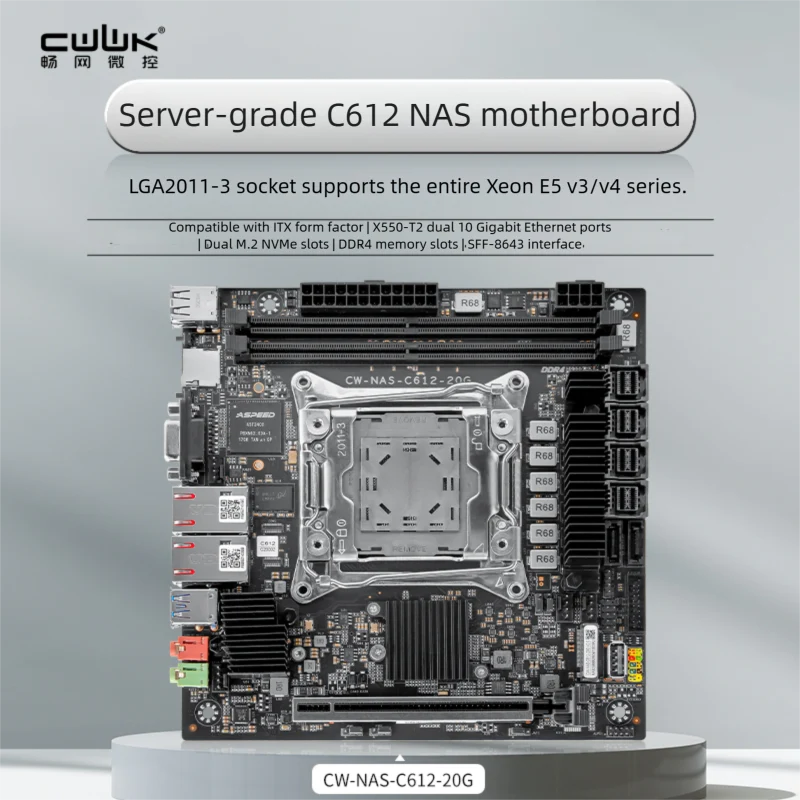
And then I find it. The board that checks every box, falls in my price range, and for the most part won’t require me to compromise at all. The board is the CWWK C612 Xeon ECC DDR4 E5 V3/V4 NAS Motherboard. It has just about everything I am looking for:
- LGA2011-# socket that support the entire Xeon E5 v3/v4 series
- 2 x NVME PCI-e 3.0 x4 slots
- 2 x DDR4 DIMM slots supporting dual channel Registered ECC Memory
- PCI-e x16 expansion slot supporting bifurcation
- 2 x SATA 3.0 Slots
- 2 x SFF-8643 PCI-e 3.0 x4 ports supporting U.2 drives
- 2 x SFF-8643 PCI-e 3.0 x ports supporting SATA drives
- 2 x 10 Gigabit Ethernet Ports
The board will support up to 10 SATA drives between the native SATA ports and the SFF-8643 expansion ports. With a full PCI-e x16 slot that supports bifurcation, I have a multitude of options for the expansion slot. As the board already comes with dual 10 Gigabit Ethernet adapters I don’t need to use the slot for a 10 Gigabit fiber adapter. A GPU to offload transcoding in Jellyfin or to run lightweight LLM models is one option. A PCI-e NVME adapter to add up to an additional 4 NVME drives in yet another possibility. Point being that I have a lot more options with a full x16 slot.
I will fully admit that there is a bit of a concession I am making in choosing this board. This is not cutting edge, latest generation technology. We are talking about a processors that first debuted in 2016; in this case I am referring the Xeon E5 v4 series processors. A solid 10 years old at this point. That said, I think that this platform still has a lot of life left in it. The good news for me is that Xeon E5 v4 processors can be had for less than $50 on eBay these days. To be honest I prefer a server-based platform, especially one that supports Registered ECC memory. The E5 v4 family of processors also provides a lot of options from 4 to 22 cores, all with hyperthreading, so I will not be needing for processing power.
As I detail in my Project ReKernel article, I am not doing a lot of heavy lifting with my virtual machines. Even with the additional services I am planning to run in the future, I will have plenty of headroom and I don’t see this platform as being any kind of bottle neck. If this upgrade is a success I full plan to convert the second NAS I have as well for extra capacity and redundancy.
I am very confident in my decision to move forward with this board and platform. It meets all my requirements, including price, and I see a lot of potential for my home lab plans. I was able to get the board for $178, which as of today is still the current price.
Completing the Package
Now that I had chosen the board, I needed to make some additional purchases. I did not have any Xeon E5 v4 processors. Luckily I was in possession of a 48GB of DDR4 ECC memory (32GB & 16GB sticks). I would prefer to have the RAM capacities match as well as have at least 64GB of RAM in the system, so more that likely I will pickup another 32GB stick of RAM if I can find decent pricing.
As mentioned Xeon E5 v4 processors are relatively cheap on eBay. I ended up deciding on the Xeon E5 2630L V4 processor.
- 10 Cores
- 20 Threads
- Max Turbo Frequency 2.90 GHz
- Intel® Turbo Boost Technology 2.0 Frequency
- Bus Speed 8 GT/s
- TDP 55W
One main of main reasons I went with this processor is that it had a high enough core count for my needs and it is one of the L series chips available in this family. The L series processors have a lower TDP and require less power. I will be sticking with the stock PSU that comes with the NAS which is only 200 Watts. With potentially 5 x 3.5 inch drives, and possibly 2 or 3 2.5 inch drives, I need to be as lean as possible to stay within the power budget. I was able to pick one up on eBay for $48.
The last component I needed was a CPU cooler. As I have very limited space inside the chassis below the drive cage, I thought that a cooler for a 1U server chassis would be low profile enough to fit. I have done some 1U and 2U builds in the past so I was already familiar with Dynatron which specializes in cooling products. I chose the Dynatron R16 1U cooler. Its a solid cooper heatsink with the 19.1 CFM fan that supports the LGA2011 socket. It should fit with no issues and provide more than adequate cooling. It set me back another $62.
Next Stop the Build
I still have not settled on whether or not I will upgrade the second RAM stick to 32GB, but I have received all the other parts at this point. I am ready for the build. I do plan to bench test the board, processor, and RAM prior to installing into the chassis just to be sure everything is working properly and there are no surprises. I won’t have a lot of space in the chassis to mess around with things once they are installed. In the next article I will detail the build and integrate it into the home lab. Hopefully you will join me for the next steps. As always, I hope that you found this both interesting and informative and I will see you down the road.